Browser Profile Warming: How It Works in WadeX
Browser Profile Warming creates browsing activity and local data before a new profile is used. Learn how profile warming works in WadeX and what it can and cannot do.

- 1.What Is Browser Profile Warming?
- 2.Why Anti-Fraud Systems May Care
- 3.Cookies, Cache, and History
- 4.How to Warm a Browser Profile Properly
- 5.Does Browser Profile Warming Really Work?
- 6.Natural Activity Simulation
- 7.Extended Warming in WadeX
- 8.Summary
When you create a new profile in an antidetect browser, it has no accumulated Cookies, browsing history, or other local data that normally appears during regular browser use. The profile essentially starts from a clean state.
Browser Profile Warming is a feature that allows you to create regular browsing activity in advance. In WadeX, this process can be automated: the browser visits websites, navigates between pages, and gradually builds local profile data before you start using the profile for its main tasks.
Warming does not guarantee that a profile will pass anti-fraud or anti-bot checks. It is a supporting tool for creating a more natural initial state for a new browser profile.
What Is Browser Profile Warming?
Profile warming in WadeX works by automatically visiting websites. You can provide your own list of sites or let the browser generate one based on the Proxy and selected location.
The system can prioritize popular websites for the corresponding region, helping the browsing activity better match the profile’s network environment.
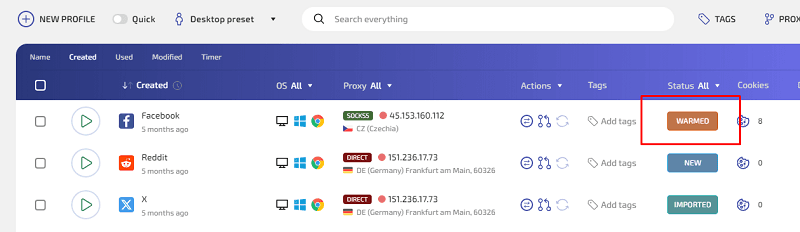
During warming, WadeX can also simulate visits from search engines. Available options include Google, Bing, Yahoo, Baidu, Yandex, DuckDuckGo, Ask.com, Ecosia, Qwant, and Seznam.
The browser does not have to stop at a site’s homepage. Depending on your settings, it can navigate deeper into the website. You can configure the navigation depth and how long the browser stays on individual pages.
As a result, the profile gradually accumulates browsing activity and local data similar to what appears during regular browser use.
Why Anti-Fraud Systems May Care
Anti-bot, analytics, and advertising systems are used across many websites and can analyze different characteristics of a browser session.
A newly created profile is different because it has little or no accumulated local state. Depending on the platform, this may be one of many signals available to its detection systems.
Warming allows the profile to visit different websites before its main use begins. However, different anti-fraud systems evaluate users in different ways, so having prior browsing activity does not automatically result in a higher trust level.
Cookies, Cache, and History
During warming, WadeX can accumulate Cookies, Browser Cache, and browsing history inside the profile.
However, these types of data work differently. Websites cannot directly access your entire browsing history or Browser Cache. Cookies, meanwhile, are generally available only within the relevant domains and according to their applicable rules.
For this reason, Browser Profile Warming is better understood as a way to create a normal local state for a new profile rather than as a universal method for increasing trust with websites.
How to Warm a Browser Profile Properly
A basic warming process looks like this:
- Create a new profile and, if necessary, assign a Proxy.
- Start Browser Profile Warming in WadeX. The browser will visit websites, navigate between pages, and build local profile data.
- After warming, you can leave the profile without active use for some time if that fits your workflow.
- When you start using the profile, try to keep its network environment and browser parameters reasonably consistent.
There is usually no need to run warming many times per day simply to generate more activity. Consistent and natural profile use is generally more important than maximizing the number of website visits.
Does Browser Profile Warming Really Work?
Its effectiveness depends on the target website, your workflow, and the checks used by the platform.
Browser Profile Warming can help create Cookies, browsing history, and other local state before the profile is used for its primary task. However, it cannot guarantee fewer checks or that a website will automatically treat the profile as a regular user.
Warming is only one part of the overall browser profile configuration.
Natural Activity Simulation
WadeX goes beyond simply opening a list of websites. During warming, the browser can perform navigation, page scrolling, and other actions supported by the feature.
This creates a more varied browsing history compared with simply opening several URLs one after another.
However, automated warming should not be considered indistinguishable from real human behavior, and it does not guarantee that automation detection systems will not identify automated activity.
Extended Warming in WadeX
WadeX provides additional Browser Profile Warming settings, including the ability to use the feature with profiles on the free plan.
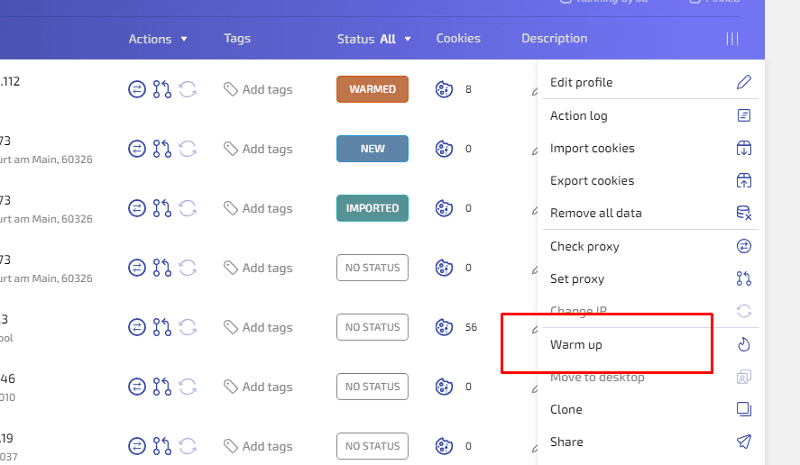
Warming options include:
- Using custom or automatically generated website lists
- Simulating visits from multiple search engines
- Adjusting navigation depth
- Configuring page visit duration
- Maintaining a stable network connection for a more consistent profile environment
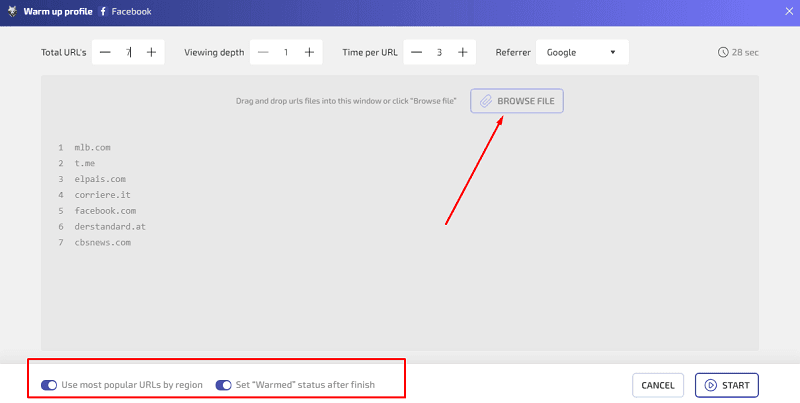
These settings allow you to adapt the warming process to a particular browser profile and its intended workflow.
Summary
Browser Profile Warming is a way to create local state and browsing history for a new browser profile before its primary use begins.
In WadeX, the process is automated: you can select websites, configure search engine visits, set navigation depth, and control how long pages remain open.
When using a Proxy, it is also important to maintain reasonable consistency between the IP location and other profile parameters. Warming itself does not provide complete anonymity or guarantee that anti-bot or anti-fraud checks will be avoided.
Still, it can be a useful preparation step for new isolated browser profiles, especially when you want to build Cookies, browsing history, and other local data before starting the main workflow.