Regular Browser vs. Antidetect Browser: Key Differences
Compare regular and antidetect browsers by Browser Fingerprint, Canvas, WebGL, Cookies, browser profiles, Proxy, VPN, and network settings.
- 1.What Data Does a Regular Browser Expose to Websites?
- 2.Why Incognito Mode Is Not an Antidetect Browser
- 3.How WADE X Differs From a Regular Browser
- 4.How Browser Profiles and Stored Data Differ
- 5.Regular Browser vs. WADE X: Key Differences
- 6.How WADE X Handles Canvas and WebGL
- 7.Proxy, VPN, and Antidetect Browsers Solve Different Problems
- 8.Can You Turn Chrome Into an Antidetect Browser With Extensions?
- 9.When Is a Regular Browser Enough?
- 10.Conclusion
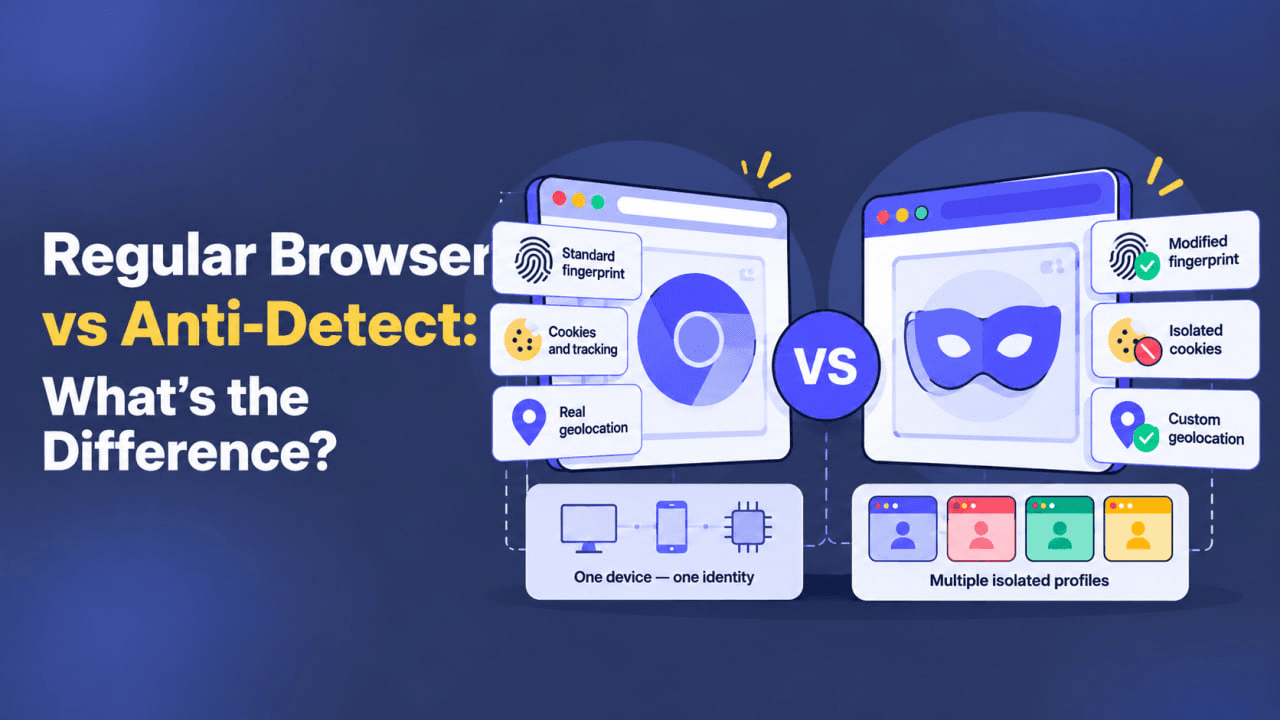
Chrome, Firefox, Safari, and other regular browsers are designed for everyday web browsing. Incognito Mode can prevent local browsing history from being saved after the window is closed, while a VPN can change your public IP and route network traffic through another server. However, neither creates a separate digital environment for each browser profile.
Websites can analyze more than just Cookies and IP addresses. They may also examine a Browser Fingerprint composed of User-Agent, Client Hints, Canvas, WebGL, WebRTC, AudioContext, fonts, screen parameters, and other characteristics.
Antidetect browsers such as WADE X work with these parameters at the individual profile level. The key difference is therefore not simply privacy. It is the ability to create isolated browser environments and manage their characteristics separately.
What Data Does a Regular Browser Expose to Websites?
When you visit a website through Chrome, Firefox, or another standard browser, the page can access certain information about your browser and device. Some of this data is required for websites to display content and provide functionality correctly.
Available characteristics may include:
- User-Agent and Client Hints;
- browser and operating system versions;
- Screen Resolution and Color Depth;
- Timezone;
- language preferences;
- Navigator API properties;
- information about supported browser features.
JavaScript can also access or derive additional parameters that may contribute to Browser Fingerprinting.
For example, Canvas allows a website to request a specific rendering operation and analyze the resulting image. The output can be influenced by the operating system, browser, fonts, graphics stack, and other characteristics of the environment.
WebGL can reveal additional information about the graphics environment, including Renderer, Vendor, Extensions, and rendering behavior.
With AudioContext, a website can analyze how the browser processes a generated audio signal. This type of Audio Fingerprinting does not require microphone access.
ClientRects exposes the dimensions and coordinates of HTML elements. Small differences can occur because of fonts, display scaling, and operating system rendering behavior.
WebRTC, primarily designed for real-time communications, can also expose network-related characteristics of the browser environment.
None of these parameters necessarily identifies a user on its own. Browser Fingerprinting generally relies on analyzing multiple signals together.
Why Incognito Mode Is Not an Antidetect Browser
Incognito Mode is primarily designed to limit the amount of browsing data stored locally after a private session ends.
It does not create a new virtual device or automatically change Canvas, WebGL, hardware characteristics, or other Browser Fingerprint components.
If you open a regular browser window and an Incognito window on the same computer, many characteristics of the environment will remain identical.
This makes Incognito useful when you do not want browsing history and certain local session data to remain after closing the window. Its purpose, however, is fundamentally different from that of an antidetect browser.
How WADE X Differs From a Regular Browser
WADE X is built around separate browser profiles.
Each profile functions as an independent environment with its own settings, Cookies, and other session data. Browser Fingerprint parameters are also managed as components of the profile and should remain consistent with one another.
WADE X works with characteristics such as:
- User-Agent and browser parameters;
- Canvas;
- WebGL and WebGPU;
- Audio Fingerprint;
- ClientRects;
- Screen Resolution;
- language settings;
- Timezone;
- WebRTC;
- other Browser Fingerprint components.
The goal is not to generate as many random values as possible. A profile can become internally inconsistent if, for example, its User-Agent describes one platform while its graphics or system characteristics indicate another.
Consistency across the browser environment is therefore important.
With Smart Mode, WADE X selects profile parameters that are close to a natural device configuration, helping different Browser Fingerprint components remain logically consistent.
How Browser Profiles and Stored Data Differ
Another major difference is how browser data is separated.
Regular browsers can support multiple user profiles, but these features are primarily designed to separate everyday user settings and data. For example, someone might maintain separate personal and work profiles in Chrome.
WADE X is specifically designed around independent browser profiles.
Each profile can maintain its own:
- Cookies;
- Local Storage;
- IndexedDB;
- Cache;
- website data;
- Browser Fingerprint settings;
- network configuration.
This helps prevent session data from different working environments from being mixed together.
Regular Browser vs. WADE X: Key Differences
| Parameter | Regular Browser | WADE X |
|---|---|---|
| Primary purpose | Everyday web browsing | Managing separate browser profiles |
| Browser Fingerprint | Primarily reflects the current device environment | Parameters are managed within each profile |
| Canvas | Depends on the current browser and device | Managed as part of the Browser Fingerprint |
| WebGL | Tied to the real graphics environment | WebGL Image uses the real GPU and WebGL Context can be managed |
| WebRTC | Standard browser behavior | Can be configured within the profile |
| Cookies and Storage | Stored within the regular browser environment | Isolated between profiles |
| Proxy | Usually requires browser, extension, or system-level configuration | Can be configured separately for each profile |
| Geolocation-related parameters | Primarily based on the current system | Can be configured according to the profile |
| Multiple environments | Standard user profiles | Separate working browser profiles |
| Smart Mode | Not available | Available |
Title: Regular Browser vs. Antidetect Browser
Description: Compare a regular browser and WADE X by Browser Fingerprint, Canvas, WebGL, Cookies, Proxy, geolocation settings, and separate browser profiles.
How WADE X Handles Canvas and WebGL
Canvas and WebGL deserve particular attention because they are closely connected to the device’s graphics environment.
In WADE X, Canvas is treated as part of the profile’s Browser Fingerprint and managed at the browser level.
For WebGL Image, WADE X uses the device’s real GPU. It does not fully emulate an arbitrary graphics card. Minimal post-processing may be applied to the rendered output when necessary.
WebGL Context works differently. Values returned by the browser can be adjusted, but they should remain internally consistent and compatible with the other characteristics of the profile.
This differs from simple browser extensions that attempt to modify a small number of JavaScript-visible parameters on top of a regular browser.
Proxy, VPN, and Antidetect Browsers Solve Different Problems
WADE X should not be treated as a replacement for a VPN or Proxy. These tools operate at different layers.
A VPN primarily affects the device’s network connection. It routes traffic through a VPN server and changes the public IP address visible to external resources.
A Proxy also routes connections through another server. In WADE X, a Proxy can be assigned directly to an individual browser profile.
An antidetect browser primarily deals with the browser environment, profile isolation, and Browser Fingerprint parameters.
Changing an IP address therefore does not automatically change the Browser Fingerprint, and changing the Browser Fingerprint does not automatically change the public IP.
If the task specifically requires a VPN connection, a separate solution such as WhoVPN can be used, while Whoer can help verify the resulting network environment. WADE X and a VPN serve different purposes and can be used as separate components when required.
Can You Turn Chrome Into an Antidetect Browser With Extensions?
There are browser extensions that change the User-Agent, block Canvas, or attempt to modify individual JavaScript APIs.
Installing several such extensions, however, does not turn Chrome into a full antidetect browser.
The main challenge is consistency. A Browser Fingerprint consists of many related characteristics. Changing the User-Agent or adding noise to Canvas is not enough if those values contradict the browser version, operating system, graphics environment, or other parameters.
Aggressively blocking browser APIs can also create an unusual environment. If a browser unexpectedly disables commonly supported features such as Canvas or WebGL, a website can potentially use that behavior as another signal.
An antidetect browser addresses these parameters as part of the browser profile rather than relying exclusively on separate extensions.
When Is a Regular Browser Enough?
An antidetect browser is not necessary for every task.
For everyday browsing, personal email, video streaming, or working with a standard set of accounts, Chrome, Firefox, or Safari is generally sufficient.
Incognito Mode is useful when you need a temporary session and do not want its local browsing history to remain after the window is closed.
A VPN is more relevant when the primary goal concerns the network connection, public IP, or traffic routing.
WADE X is intended for scenarios where you need to create and maintain multiple independent browser profiles, separate their Cookies and Storage, manage Browser Fingerprint parameters, and configure network settings for individual profiles.
Conclusion
Regular browsers and antidetect browsers are designed for different workflows.
Chrome, Firefox, and Safari focus on everyday web browsing and generally expose characteristics associated with the actual software and hardware environment of the device.
WADE X organizes work around independent browser profiles. Each profile maintains its own session data and Browser Fingerprint configuration, while Canvas, WebGL, WebRTC, Audio Fingerprint, and other parameters are treated as components of the same environment.
VPNs and Proxies operate at a different layer. They can change the public IP and traffic route, but they do not automatically create a different Browser Fingerprint.
The appropriate tool therefore depends on the task: a regular browser is sufficient for standard browsing, a VPN or Proxy can handle network-level requirements, and WADE X is designed for managing separate browser environments and their Browser Fingerprints.
FAQ
What is the main difference between a regular browser and an antidetect browser?
A regular browser is primarily designed for everyday web browsing and generally reflects the current device environment. An antidetect browser is designed around separate browser profiles with isolated session data and managed Browser Fingerprint parameters.
Is Incognito Mode the same as an antidetect browser?
No. Incognito Mode mainly limits the local browsing data retained after a private session ends. It does not automatically create a separate Browser Fingerprint or change Canvas, WebGL, and other device characteristics.
Does a VPN change the Browser Fingerprint?
A VPN primarily changes the network route and public IP. It does not automatically change Canvas, WebGL, User-Agent, or other Browser Fingerprint characteristics.
Can Chrome become an antidetect browser with extensions?
Extensions can modify individual parameters, but a Browser Fingerprint consists of many interconnected characteristics. Changing a few values does not provide the same profile-level environment management as an antidetect browser.
How are WADE X profiles different from regular browser profiles?
WADE X profiles are designed as separate working browser environments. They can maintain independent Cookies, Storage, Browser Fingerprint settings, and network configurations.
When is an antidetect browser useful?
It is relevant when a workflow requires multiple independent browser profiles, separation of session data, management of Browser Fingerprint parameters, and individual network configurations for different profiles.
Best Anti‑Detect Browsers
WADE X, GoLogin, Multilogin, and more — compare features, mobile profiles, pricing, and team capabilities.
CompareProxies for WADE X
Find residential and mobile proxies from recommended providers for your browser profiles.