Chrome Headers, Google Sign-In, and Why DICE Matters
Google sign-in depends on more than Browser Fingerprint signals. Learn how X-Browser headers, X-Client-Data, and DICE contribute to Chrome-consistent authentication behavior.

- 1.The Headers That Matter
- 2.What Is DICE?
- 3.Why This Is Critical for Antidetect Browsers
- 4.Quick Antidetect-Browser Self-Test
- 5.Common Pitfalls
- 6.How to Select an Antidetect Browser
- 7.Summary
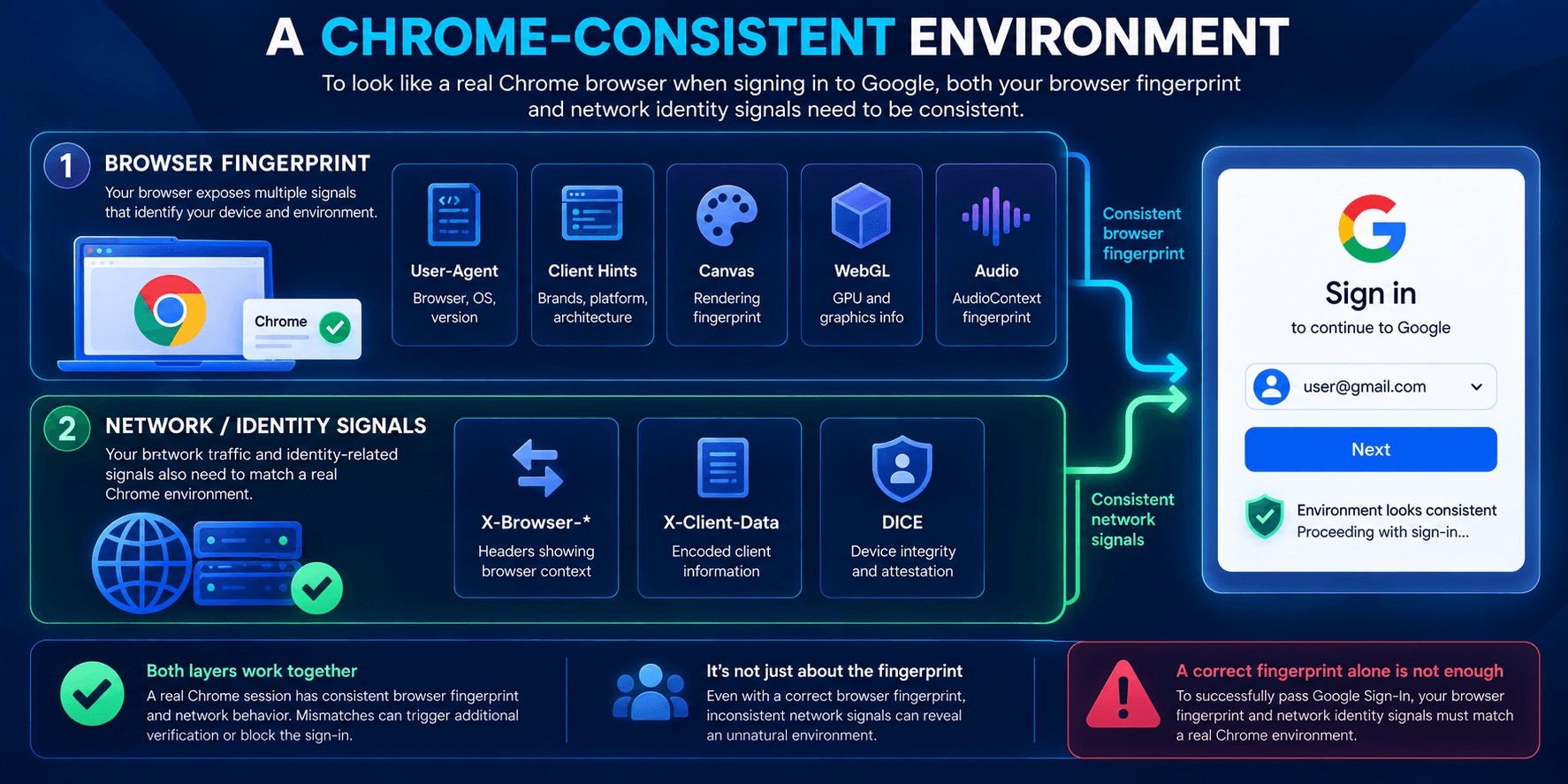
Google sign-in reliability depends not only on familiar fingerprinting elements such as User-Agent, Client Hints, Canvas, WebGL, and Audio, but also on network-level signals — in particular, the Chrome-specific headers a browser sends to Google services and the correctness of DICE (Identity Consistency) handling.
These signals are evaluated as HTTP requests are made, before page scripts execute, and can influence whether authentication proceeds normally or triggers additional scrutiny.
Chrome-specific headers comprise service fields that native Chrome attaches to certain requests, such as the X-Browser-* family and X-Client-Data. They communicate information about the browser’s release channel and the profile’s participation in Chrome Variations / Field Trials.
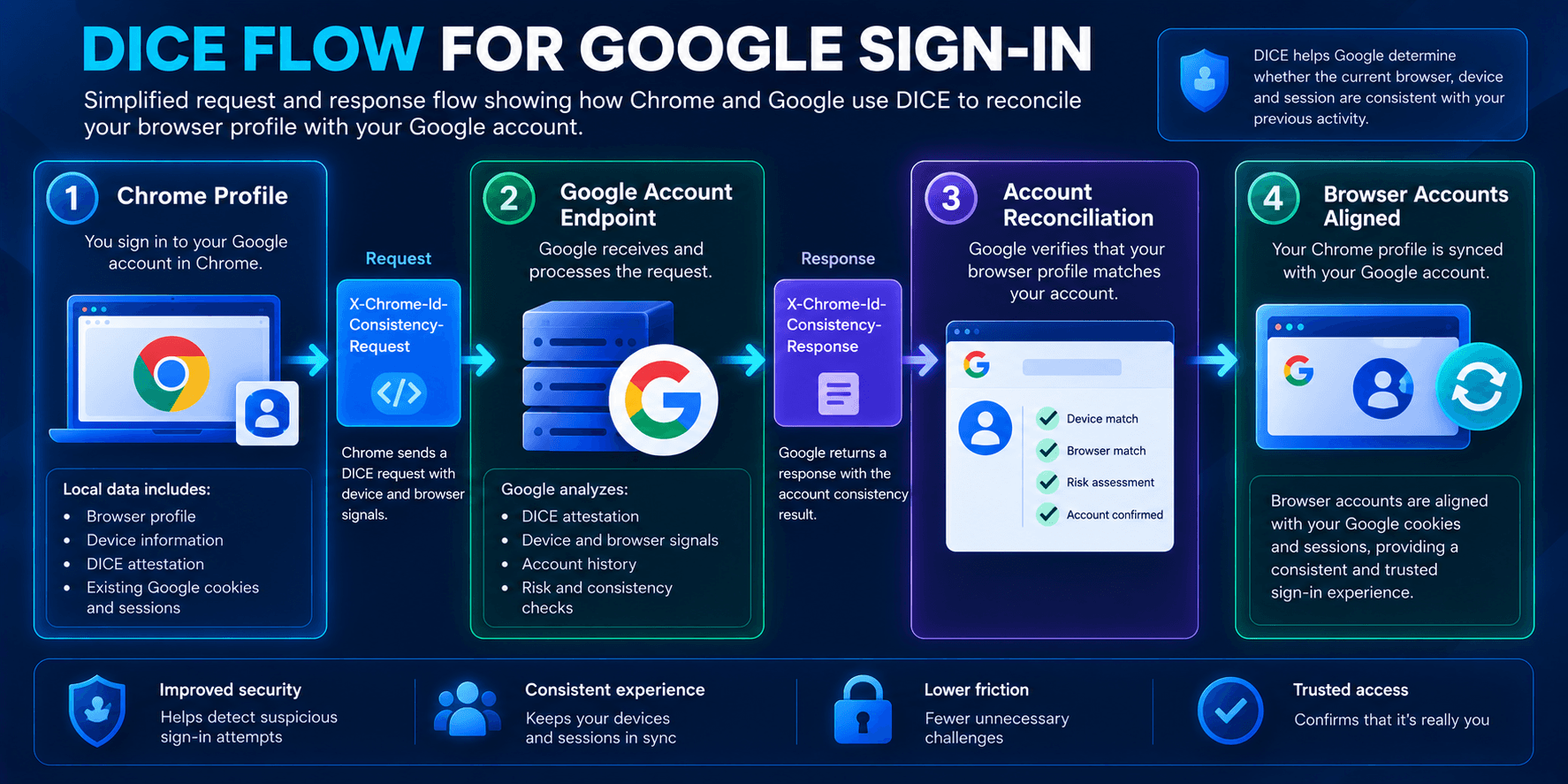
DICE is a Chrome mechanism that keeps the set of Google accounts known to the browser consistent with the accounts recognized in cookies and sessions by exchanging dedicated headers with Google sign-in endpoints.
If these elements are missing, implausible, or processed incorrectly, authentication behavior may differ from native Chrome and can contribute to additional CAPTCHAs, repeated sign-in prompts, or session resets.
This article focuses on three practical objectives:
- Identify the relevant headers and explain their roles:
X-Browser-*,X-Client-Data, and the DICE request/response pair. - Describe DICE at a high level, including when the headers are sent and how they affect account reconciliation.
- Provide verification steps and selection criteria, so you can evaluate an antidetect browser such as WadeX for Google sign-in use cases.
The scope here is client-side, network-observable behavior. It does not attempt to describe Google’s internal risk scoring or guarantee authentication outcomes.
The goal is to understand which signals matter, how to recognize them, and how to confirm that a browser behaves in a Chrome-consistent manner.
The Headers That Matter
X-Browser-*
Chrome attaches a small service “signature” to certain requests.
Typical fields include the release channel, a year line, a copyright string, and a validation marker:
X-Browser-Channel— stable/beta/dev/canary;X-Browser-Year— year line;X-Browser-Copyright— copyright string;X-Browser-Validation— validation marker.
Missing or implausible values can create a mismatch with the expected behavior of native Chrome.
X-Client-Data
X-Client-Data is associated with Chrome Variations / Field Trials.
It is a web-safe Base64 Protocol Buffers (protobuf) payload containing lists such as variation_id and trigger_variation_id.
Two properties are particularly important:
- it is profile-scoped and associated with a specific profile;
- it is dynamic and may evolve over time.
A single hard-coded blob reused across profiles does not reproduce this behavior correctly and can create another consistency issue.
X-Chrome-Id-Consistency-Request / …-Response (DICE)
This header pair is used by DICE.
At a high level, Chrome sends the Request to relevant Google account endpoints, such as accounts.google.com. The server can return the corresponding Response, which Chrome processes as part of account reconciliation.
The goal is to align the browser’s account list with what Google observes in cookies and sessions.
Incorrect timing, destinations, or handling — for example, sending the Request but ignoring the Response — can make the sign-in flow behave differently from native Chrome.
What Is DICE?
DICE (Identity Consistency) keeps the accounts inside a browser profile consistent with the accounts visible to Google through cookies and sessions.
When DICE is absent, incomplete, or inconsistent, the browser may look like Chrome at the fingerprint level while behaving differently at the identity and network level.
Possible symptoms include:
- additional CAPTCHAs;
- repeated sign-in prompts;
- login loops;
- unstable account sessions.
DICE in this context should not be confused with the similarly named hardware concept Device Identifier Composition Engine.
Why This Is Critical for Antidetect Browsers
Early Network-Level Signal
Chrome-specific headers are transmitted as part of HTTP requests, so they can be evaluated before page JavaScript begins fingerprinting the environment.
Anomalies in X-Browser-*, static or implausible X-Client-Data, or incomplete DICE handling can therefore create inconsistencies independently of Canvas, WebGL, or other familiar fingerprint signals.
Chrome-Like Sign-In Path
Without a correct DICE flow, the sign-in process can diverge from native Chrome behavior.
The browser may expose a convincing Chrome fingerprint while handling account state differently at the network level.
Dynamics Over Templates
X-Client-Data should behave like profile-specific state rather than a fixed string reused everywhere.
This is an example of why reproducing Chrome behavior requires more than copying a predefined set of values.
Behavior Over Checkboxes
Correct values matter, but so do:
- when headers are sent;
- which endpoints receive them;
- how responses are processed;
- whether the values align with the declared Chrome version and channel;
- how account state behaves during multi-account usage.
Quick Antidetect-Browser Self-Test
A basic check can be performed through DevTools:
- Create a fresh profile.
- Launch it once, close it, and then relaunch it to allow profile-specific state to initialize.
- Open DevTools → Network and visit
accounts.google.com. - Inspect several relevant requests and verify:
X-Browser-*is present where expected and looks plausible;X-Client-Datais non-empty and contains variation-related data;X-Chrome-Id-Consistency-Requestappears in the relevant flow and corresponding responses are handled.
- Complete sign-in and check the account’s Devices page. The device name and type should be consistent with the represented OS and browser environment.
If you encounter persistent CAPTCHAs or login loops, possible areas to investigate include headers and DICE handling, proxy quality, and profile state.
Common Pitfalls
Missing X-Browser-*
If an environment presents itself as Chrome but lacks expected Chrome-specific request behavior, it can create an obvious consistency issue.
Static or “Thin” X-Client-Data
Potential problems include:
- an identical blob across unrelated profiles;
- missing or unusually limited variation data;
- a value that never changes with profile state.
“Paper DICE”
A superficial implementation may send the DICE Request while failing to perform actual reconciliation.
For example, the browser may ignore the corresponding Response or fail to maintain consistent account state.
The headers are technically present, but multi-account flows and sessions can still remain unstable.
How to Select an Antidetect Browser
Google Sign-In Support
Look for correct handling of:
X-Chrome-Id-Consistency-*;X-Browser-*;X-Client-Data.
A practical trial should include visiting accounts.google.com, inspecting the relevant requests, and testing whether authentication remains stable.
Fingerprint Alignment
User-Agent and Client Hints should align with the declared OS and browser version.
Other signals should also remain consistent, including:
- DPR and screen parameters;
- WebRTC;
- fonts;
- media devices;
- timezone;
- locale.
Profiles and Collaboration
Useful capabilities include:
- strong profile isolation;
- reliable backup and restore;
- migration between machines;
- profile sharing with roles and activity logs.
Networking
The browser should handle proxy configurations reliably, including:
- residential and mobile proxies;
- IP and username/password authentication;
- proxy rotation;
- network diagnostics such as ASN, DNS, headers, and geolocation.
Warm-Up and Tooling
Depending on the workflow, useful features may include:
- macros and automation;
- auto-scroll;
- configurable delays;
- cookie management;
- session and bookmark import/export.
Anti-Bot Guidance
Avoid tools that promise a “100% pass rate.”
More realistic guidance focuses on maintaining a consistent environment, including stable proxies, profile state, Browser Fingerprint, and correct network-level behavior.
Updates and Support
Look for regular Chromium/Blink updates, a public changelog, and responsive technical support.
Cost and Limits
Consider:
- availability of a trial;
- profile limits;
- team limits;
- traffic restrictions;
- predictable pricing.
Summary
Google sign-in depends on more than a superficial Chrome identity.
At the network and identity level, several elements can contribute to Chrome-consistent behavior:
- believable
X-Browser-*; - profile-specific and evolving
X-Client-Data; - correct DICE request and response handling.
These mechanisms complement familiar Browser Fingerprint signals such as User-Agent, Client Hints, Canvas, WebGL, and Audio.
When the browser fingerprint, HTTP behavior, and account state are aligned, the authentication flow is closer to what is expected from native Chrome.
This does not guarantee successful authentication or eliminate CAPTCHAs in every case, because Google can evaluate many other signals. However, it removes important inconsistencies between the browser’s declared identity and its actual network behavior.