UDP over SOCKS5 in an Antidetect Browser: Capabilities and Limitations
How UDP over SOCKS5 works, why QUIC and HTTP/3 depend on the network route, and how to verify that UDP traffic actually passes through a proxy.

An antidetect browser relies on more than Browser Fingerprint settings. Its network stack, proxy configuration, and network restrictions also affect how connections are established. The presence or absence of HTTP/3 alone does not indicate whether a browser profile is configured correctly.
UDP matters in this context because QUIC, the transport protocol used by HTTP/3, runs over UDP. However, selecting SOCKS5 in the proxy settings does not automatically make UDP available to the browser. Support must be verified separately at the proxy server, client, and actual connection levels.
This article explains how SOCKS5, UDP, QUIC, and HTTP/3 relate to one another, why using HTTP/2 can be perfectly normal, and how to examine the network behavior of a specific WADE X configuration.
Antifraud Systems and Consistent Network Behavior
Some risk-assessment systems may consider the connection characteristics visible to them alongside Browser Fingerprint, cookies, and session data. However, the network information available to a particular system depends on where the checks take place. A website does not necessarily see every detail of how the browser communicates with its proxy.
Using HTTP/2 instead of HTTP/3 is not, by itself, evidence of a malfunction or a proven antifraud signal. Regular browsers may use HTTP/2 for many reasons: the server does not offer HTTP/3, the network restricts UDP, QUIC is disabled in the browser settings, or a different route is selected.
When analyzing network behavior, it is therefore important to distinguish an observable fact—such as the protocol negotiated for a specific connection—from assumptions about how an antifraud system might interpret it.
How UDP Relates to QUIC and HTTP/3
UDP provides the underlying transport for higher-level protocols used by modern browsers.
One example is QUIC, a UDP-based transport protocol specified in RFC 9000. HTTP/3, defined in RFC 9114, runs over QUIC.
HTTP/3 is designed to support efficient web connections and can be particularly useful on networks with latency, packet loss, or changing conditions.
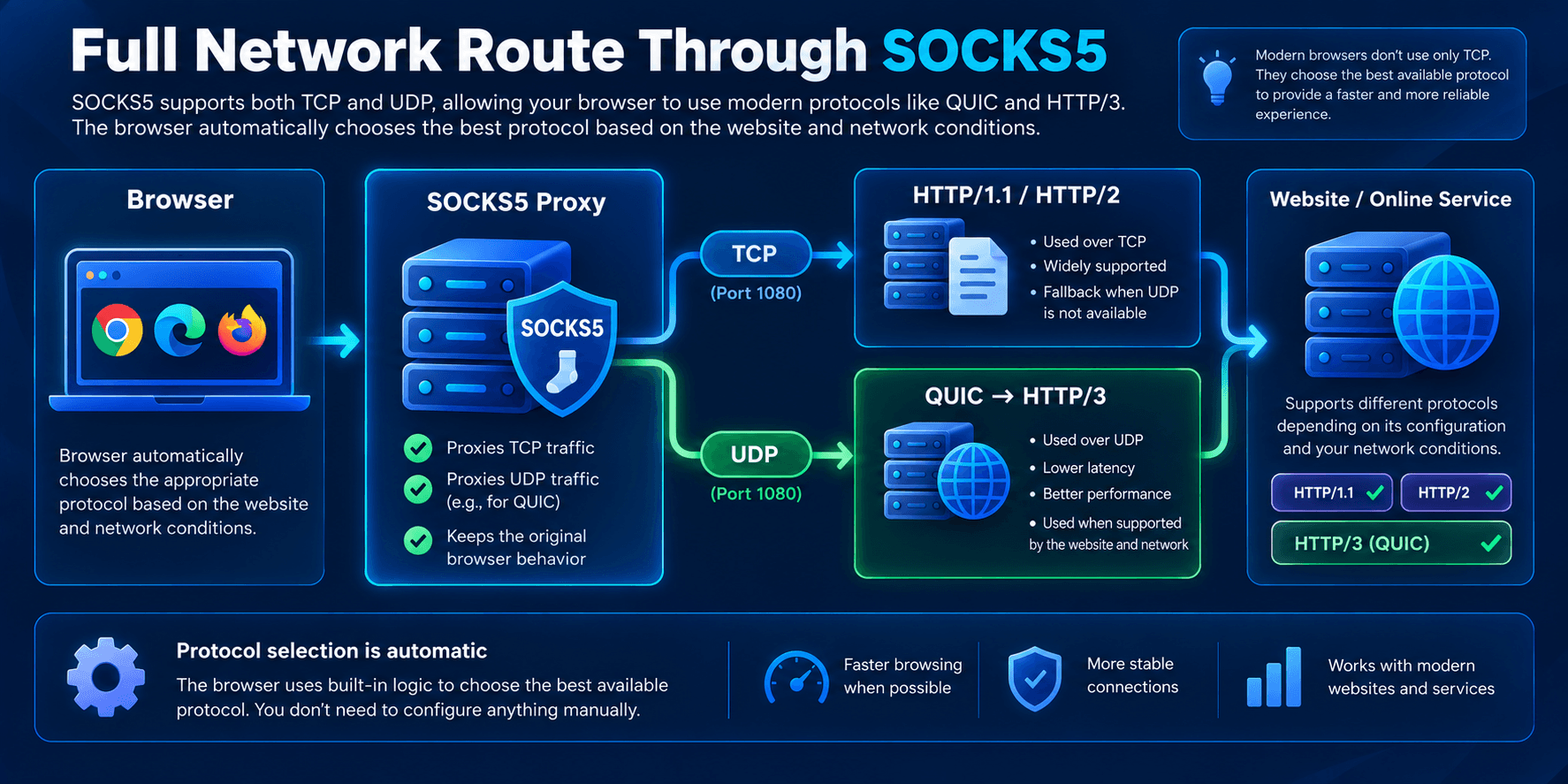
If UDP is unavailable on a particular network route, QUIC over UDP cannot operate through that route. This does not mean the browser was necessarily going to use QUIC for every request.
If a browser attempts to establish an HTTP/3 connection and that attempt fails, it may use another available protocol, such as:
- HTTP/2;
- HTTP/1.1.
This type of fallback is a normal mechanism.
Choosing HTTP/2 does not, on its own, indicate a problem. To determine why HTTP/3 was not used, check the server’s capabilities, browser settings, proxy support, and UDP availability along the route.
What Happens When an Antidetect Browser Cannot Use UDP over SOCKS5
If a browser routes traffic through a SOCKS5 proxy that does not relay UDP, QUIC/HTTP/3 cannot use that proxy route. Websites can generally still load over HTTP/2 or HTTP/1.1 using TCP.
One possible sequence is:
- A website offers HTTP/3, and the browser is configured to use QUIC.
- The browser attempts to establish a QUIC connection over an available route.
- If UDP is unavailable on that route, the attempt may fail.
- The browser may continue over HTTP/2 or HTTP/1.1 using TCP.
This is only one possible scenario. A browser may select HTTP/2 immediately without attempting QUIC at all. Seeing HTTP/2 in DevTools therefore does not prove that fallback occurred, much less that an antifraud system detected anything.
If a particular task requires UDP transport, its absence may affect the availability of the relevant network features. Any resulting delays or timeouts should be confirmed through measurements rather than inferred solely from the use of HTTP/2.
Why Browser Fingerprint Settings Cannot Fix Missing UDP Support
Browser Fingerprint settings alone cannot compensate for an unavailable UDP route.
You can configure:
- User-Agent;
- Canvas;
- WebGL;
- device parameters;
- operating system;
- other browser characteristics.
But these settings cannot make a network route support UDP.
Available transport protocols depend on the browser implementation, proxy, and network route—not just the Browser Fingerprint. Network capabilities should therefore be tested separately from profile settings. The absence of HTTP/3 should not automatically be treated as evidence that a profile is incorrectly configured or suspicious.
Why SOCKS5 Support Matters
SOCKS5 is specified in RFC 1928, which defines the UDP ASSOCIATE command for relaying UDP datagrams through a proxy. However, the fact that a proxy supports SOCKS5 does not guarantee that UDP relaying is implemented or available in a particular configuration.
Three distinct levels must be considered:
- Proxy server. Does it accept
UDP ASSOCIATE, permit UDP relay, and provide a working route? - Browser or other client. Can this specific client version send UDP through the configured SOCKS5 proxy? A working UDP-capable proxy is not enough if the client only sends TCP through it.
- Actual connection. Was QUIC/HTTP/3 used when connecting to a particular website? This also depends on the server’s HTTP/3 support, browser settings, and network conditions.
Successfully connecting to a SOCKS5 proxy and loading an HTTPS website confirms that the relevant connection works. It does not establish that UDP traffic passed through the proxy.
TCP and UDP in an Antidetect Browser Setup
| Feature | SOCKS5 without UDP relay | SOCKS5 with an available UDP route |
|---|---|---|
| Standard HTTP/HTTPS over TCP | May work | May work |
| Server-side @@inline-code: 2@@ | Unsupported or unavailable | Supported and available |
| Client-side UDP through the proxy | Unavailable on this route | Requires separate client support |
| QUIC through this proxy route | Unavailable | Possible if the client, network, and server support it |
| HTTP/3 through this route | Unavailable unless QUIC uses another route | Possible, but not guaranteed |
| HTTP/2 over TCP | Can operate normally | Can also operate normally |
Importantly, this table compares the capabilities of a particular proxy route, not every connection made by the browser. You cannot conclude that UDP passed through the proxy if QUIC might have used a different route.
What This Means for Antidetect Browsers
A browser profile’s networking capabilities depend on the browser client, connection settings, and proxy infrastructure. UDP over SOCKS5 can be useful when an application needs to relay UDP traffic through a proxy, including for QUIC/HTTP/3 when the other requirements are met.
With WADE X, it is important to verify not only whether UDP over SOCKS5 is reported as supported, but also whether it actually works in the version and configuration being used. Without test results, it would be incorrect to claim that every WADE X profile necessarily uses HTTP/3 or that a proxy prevents the browser from using HTTP/2.
Why the Network Stack Matters as Much as the Browser Fingerprint
Browser Fingerprint and Network Behavior describe different aspects of a browser environment. The former covers browser and device characteristics; the latter concerns how connections actually operate. A browser’s support for QUIC or HTTP/3 does not mean those protocols will be used for every website request.
For accurate troubleshooting, it is more useful to inspect observable connection properties than to judge how “natural” a connection looks based on a single indicator.
Why the UDP Indicator in WADE X Is Not Enough
WADE X includes a UDP indicator that provides a preliminary assessment of protocol availability with the selected proxy settings. However, a positive indicator result does not guarantee that UDP datagrams actually travel through SOCKS5.
For this reason, the indicator alone should not be treated as proof that UDP is working. For an independent check, use specialized testing services and network diagnostic tools capable of examining UDP traffic and its route. Confirm both that the proxy server supports UDP ASSOCIATE and that the client actually relays UDP through it.
Seeing h2 in DevTools does not prove that UDP is unavailable. Conversely, h3 confirms that HTTP/3 was used for a particular connection, but does not, by itself, prove that the connection went through SOCKS5 rather than directly.
How to Test UDP over SOCKS5 and Check the Actual HTTP Protocol
- Record the configuration. Note the WADE X version, browser engine version, operating system, proxy type, QUIC settings, and connection method.
- Test the proxy server. Confirm that it supports
UDP ASSOCIATEand actually relays UDP datagrams. A successful TCP connection to SOCKS5 is not sufficient. - Check the client. Determine whether this specific browser version can send UDP through the configured SOCKS5 proxy. Server and client capabilities may differ.
- Choose a test website with verified HTTP/3 support. Confirm that HTTP/3 is available under the conditions and settings used for the test.
- Check the negotiated protocol. Use DevTools (the Protocol column) or browser network logs. An
h2result means HTTP/2 was used, but it does not explain why HTTP/3 was not selected. - Compare the results. Repeat the test in the same browser without a proxy and, if necessary, with another verified proxy configuration. Remember that changing the route also changes the connection conditions.
To confirm UDP over SOCKS5, you need evidence that UDP traffic actually passed through the proxy—not merely an h3 label in DevTools. Without route-level evidence, an alternative network path cannot be ruled out.
Conclusion
SOCKS5 defines UDP relaying through UDP ASSOCIATE, but making it work requires support from the proxy server, a client capable of using UDP through that proxy, and an available network route.
QUIC and HTTP/3 use UDP, but a browser does not have to use HTTP/3 for every connection. HTTP/2 over TCP remains a normal option, and its use does not prove that the proxy is malfunctioning or that an antifraud system has flagged the connection.
When configuring an antidetect browser, it is useful to check the actual connection protocol and independently confirm that UDP traffic passes through SOCKS5. Any conclusions about WADE X or another client should be tied to a specific version and configuration.