How close is an antidetect browser's mobile profile to a real smartphone?
Explore how WADE X mobile browser profiles reproduce Android and iOS characteristics, how mobile fingerprints and MediaDevices work, and where emulation differs from a real smartphone.

Alexey Mironov
Author covering privacy and digital security
Mobile profiles greatly expand what an antidetect browser can do. In WADE X, you can create browser environments configured for Android and iOS, access mobile versions of websites directly from your computer, and manage multiple profiles in one app. Each profile has its own device configuration, browser settings, and connection settings.
Mobile emulation involves much more than changing the User-Agent or resizing a browser window. Websites receive a whole set of characteristics associated with a mobile browser: device and operating system information, screen parameters, graphics fingerprints, and details about available media devices. The browser also accounts for how users interact with mobile webpages.
How does all of this work under the hood? We’ll look at which characteristics of real smartphones WADE X mobile profiles reproduce, how the individual emulation mechanisms work, and how Android and iOS configurations differ. We’ll also cover where mobile emulation stops and which smartphone capabilities it can’t replace.
What you get with a mobile profile
Normally, you’d use a phone to access the mobile versions of online services. But when you’re managing multiple browser environments, switching between devices gets inconvenient. A mobile profile lets you run a mobile browser session on your computer without changing the way you normally manage profiles.
In WADE X, mobile and desktop profiles live in the same workspace. Each can have its own browser configuration, cookies and other stored data, and connection settings. You can return to the same environment the next time you launch it. You can also create profiles from presets instead of setting everything up from scratch.
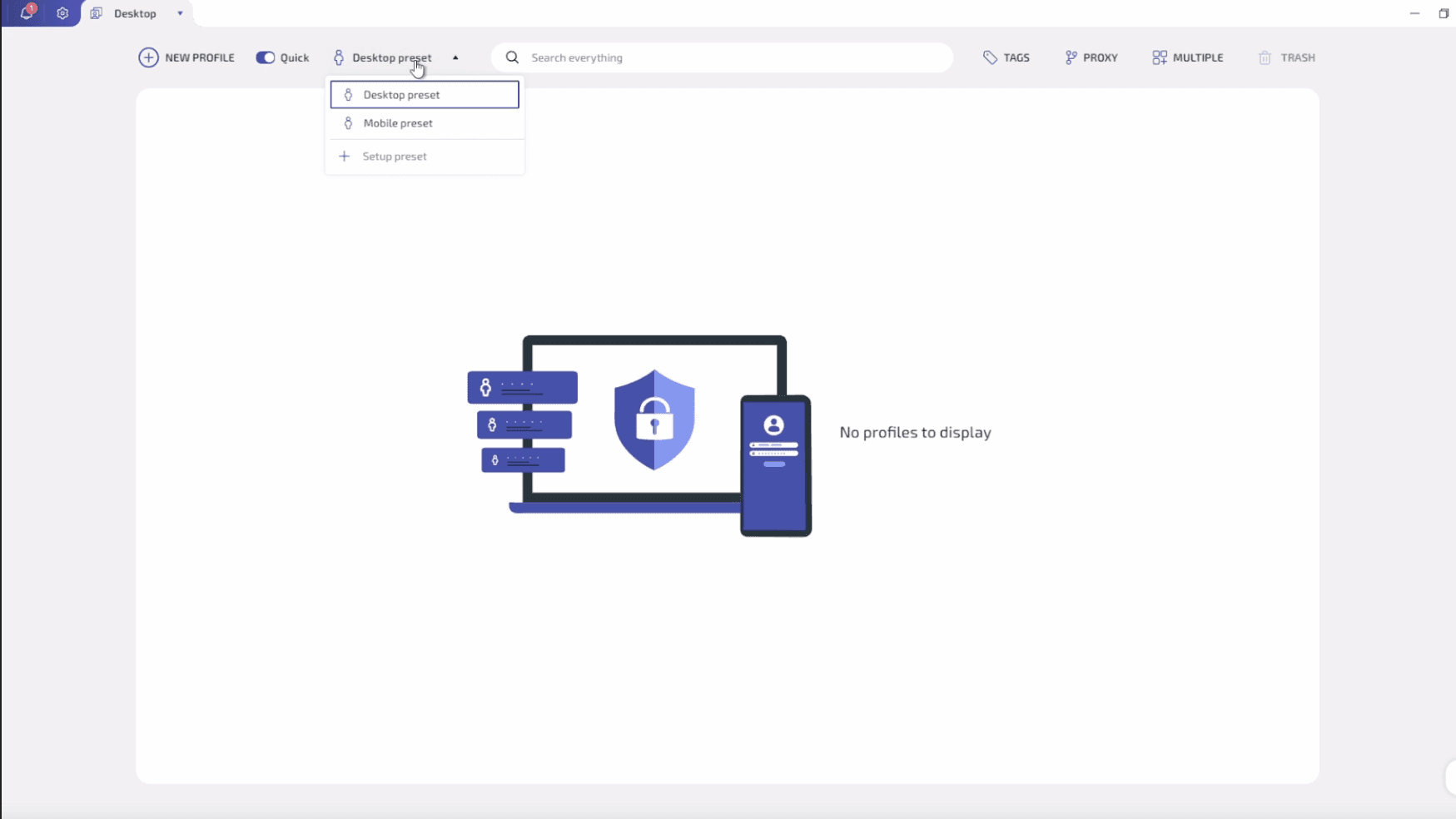
For a mobile profile, you select an Android or iOS configuration. This determines which characteristics the browser reports to websites and uses when loading mobile pages. They include screen size and viewport, browser and device information, graphics parameters, and certain input behaviors. WADE X also provides a built-in pool of device configurations, so you can select a specific smartphone model.
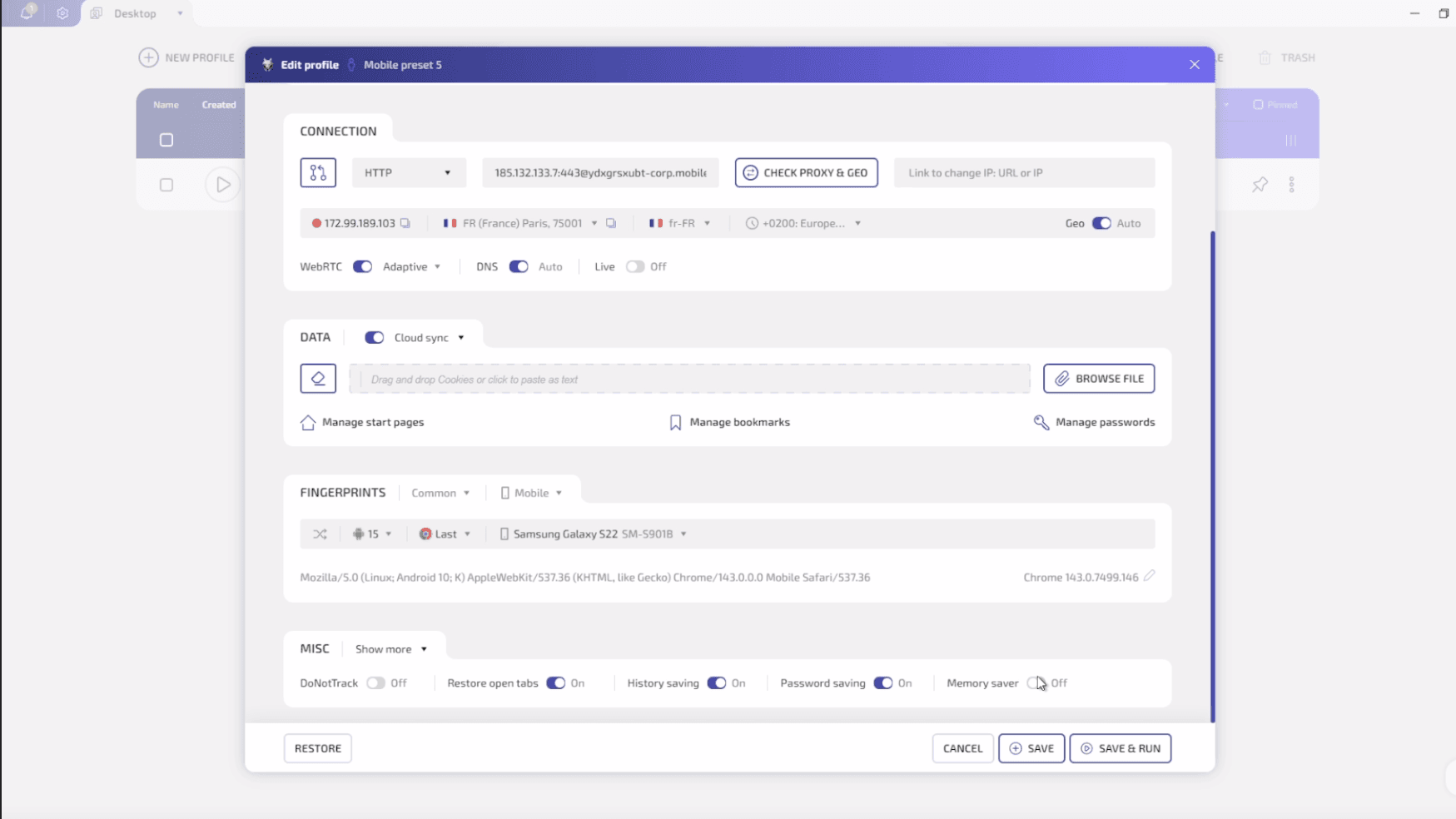
The real advantage isn’t just getting the mobile version of a website. You get a manageable browser environment with its own data and settings that you can run alongside your other WADE X profiles.
What smartphone characteristics can a website see?
A website doesn’t see the phone model you’ve selected as an image or a label in the WADE X interface. It gets information from HTTP headers, JavaScript APIs, and the results of browser operations. That’s why mobile emulation relies on a consistent set of parameters rather than a single setting.
The configuration includes platform and browser information, screen dimensions, viewport, device pixel ratio, and other characteristics expected from the selected mobile device. WADE X offers configurations based on real devices, with values chosen to match the selected model rather than generated arbitrarily.
Why Android 10 in the User-Agent doesn’t always mean Android 10
Suppose you’ve selected a newer Android version for your profile, but a website or fingerprint checker still shows Android 10 in the User-Agent string. That doesn’t necessarily mean the configuration is wrong.
Modern versions of Chrome use User-Agent Reduction. The browser sends a shortened, standardized User-Agent string in which some device and OS version details are replaced with fixed values. On Chrome for Android, that string can contain “Android 10; K” regardless of the actual Android version.
Graphics and browser fingerprints
Another set of signals comes from graphics APIs such as Canvas and WebGL. It’s important to distinguish the GPU information a browser reports from the result of actually rendering an image.
For example, WebGL Context Info describes the graphics environment, while WebGL Image represents the rendered output. Its hash can depend on the physical GPU, drivers, and runtime environment. So assigning a particular device’s graphics characteristics to a mobile profile isn’t the same as having that device’s actual GPU inside your computer.
WADE X regularly updates its fingerprinting mechanisms. In August 2026, changes were made to improve the consistency of mobile configuration parameters, and the Android device configuration pool was updated in October. That doesn’t mean every graphics result is guaranteed to match the output of a particular physical smartphone.
How a mobile profile interacts with websites
Mobile websites differ in more than the size of their interface elements. Browsers can also use different input methods and ways of interacting with a page. That’s why changing the screen resolution in a desktop browser doesn’t turn it into a mobile browser configuration.
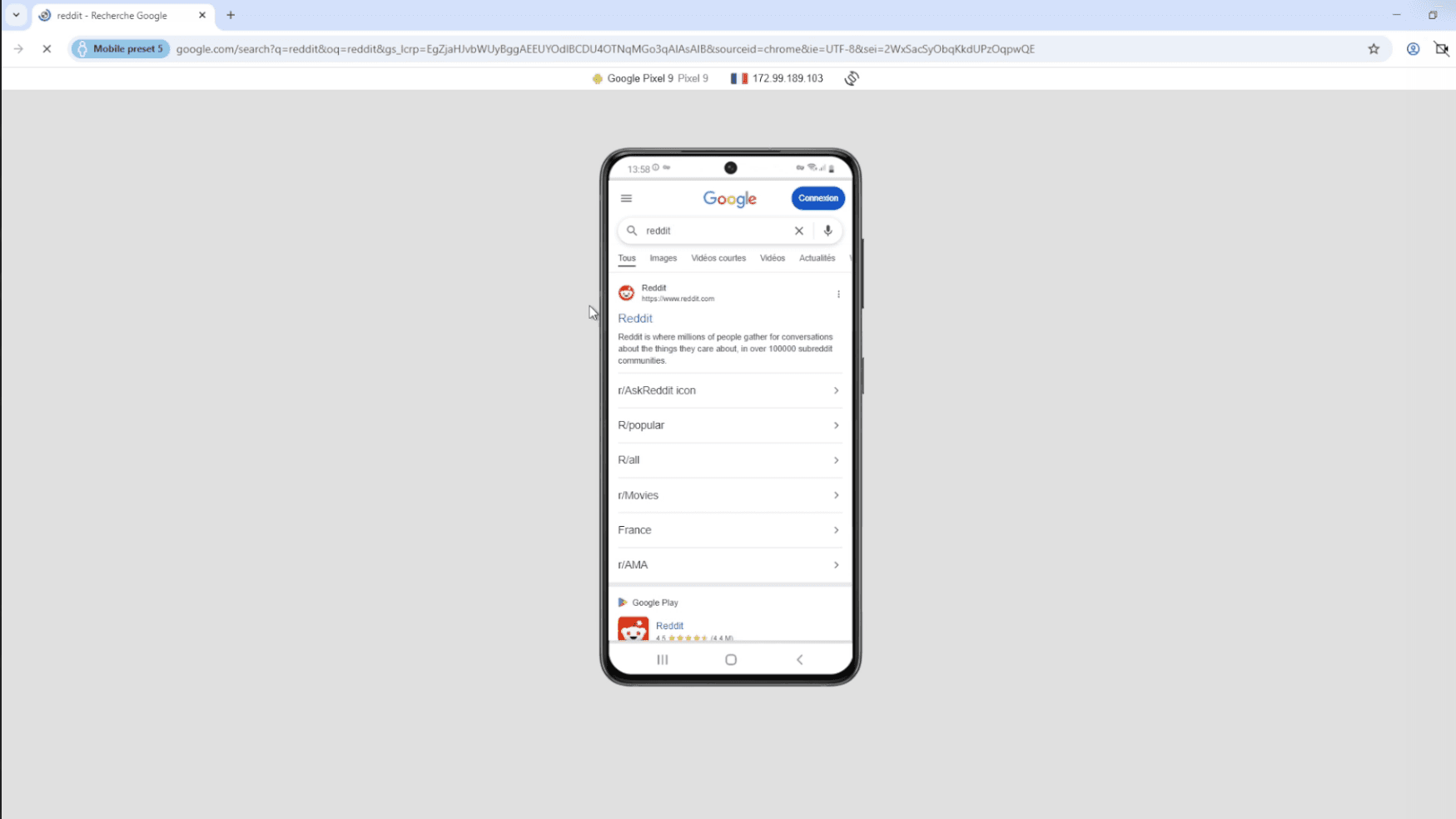
One confirmed WADE X mechanism involves touch events. In a mobile profile, interacting with a page uses a tap event, whereas a typical desktop session uses a mouse click. This lets the browser send a mobile type of input rather than simply displaying a smaller version of the page.
The browser doesn’t invent movements or behavior on the user’s behalf. What happens depends on the person’s actual actions or on how an automation script is implemented. Using a mobile profile doesn’t automatically make every automated interaction look human.
The display area matters too. Screen size describes the screen’s characteristics, while the viewport is the area in which a website lays out its page. On mobile devices, scaling and screen orientation also matter. WADE X mobile profiles support switching screen orientation.
But real smartphones also have system-level behavior that can’t be described by those numbers alone. For example, the visible area of a page may change when the on-screen keyboard appears. It’s a useful example of why a mobile viewport isn’t the same as fully reproducing the behavior of a mobile operating system. We’re not claiming that WADE X implements this particular behavior.
Browsers can also work with certain sensor signals. But emulating sensor data in a browser doesn’t mean the computer has suddenly acquired a physical accelerometer, gyroscope, or other smartphone components. What matters is which specific data a webpage can access, not simply whether a mobile preset is selected.
Cameras and MediaDevices: what does the website actually get?
Cameras and microphones are one of the clearest examples of how mobile emulation works. A website can discover these devices through the browser’s MediaDevices API and request access to a video or audio stream when needed.
In WADE X, MediaDevices information can be spoofed to match the selected configuration. This feature is enabled automatically for mobile profiles. A smartphone profile can therefore report a set of cameras typical of a mobile device, such as a front-facing camera and a rear camera.
This doesn’t mean WADE X has no tools for working with video streams. The browser has a separate video-stream spoofing feature with its own requirements and settings. Spoofing a video stream and spoofing the list of MediaDevices are different technical operations.
There’s another practical detail: when MediaDevices spoofing is enabled, the camera list may reflect the spoofed configuration rather than the computer’s real hardware. Keep that in mind if you need to select a particular physical camera. For websites that actually capture video, you need to check not just which devices are reported but whether the required stream can be opened.
How Android and iOS configurations differ
Android and iOS aren’t just two names for the same mobile preset. They differ in browser configurations, OS versions, parameter sets, and expected web behavior. WADE X supports both platforms, and iOS profiles let you choose a matching combination of iOS and Safari versions in the profile settings.
On Android, Chrome’s User-Agent Reduction mechanism, described above, is an important detail. On iOS, you need to account for the browser’s own configuration and keep the selected versions consistent. You can’t assume that everything true of an Android profile will also apply to an iPhone profile just because both are mobile.
WADE X also updates its built-in configurations. The engine 156 release, published on October 28, 2026, added configurations for new Android devices. That updates the available set of parameters, but it doesn’t establish that anything changed in the iOS configurations.
Finally, selecting Android or iOS doesn’t mean you’re running that operating system on your computer. The profile reproduces a browser environment configured for the chosen mobile platform. That’s the context in which differences between these configurations should be understood.
Does a mobile profile need a mobile proxy?
No. A mobile browser configuration and the type of internet connection are different things. Real smartphones don’t connect only through mobile carriers. They also use regular Wi-Fi. So an Android or iOS profile doesn’t have to use an IP address from a mobile proxy pool.
WADE X technical support has confirmed this separately. A mobile browser profile using a non-mobile IP is a perfectly possible setup.
The proxy determines how requests are routed out to the internet. You can configure the connection for a profile, but selecting a smartphone model doesn’t turn an ordinary proxy into a mobile network. Network characteristics depend on the connection being used, while the browser fingerprint comes from a separate set of settings and mechanisms.
Geolocation is another separate consideration. WADE X has geolocation and GPS settings for mobile profiles, but the location reported by the browser and the geographic location of the exit IP are two different sources of information. Selecting a mobile device model won’t automatically change your IP address or network characteristics.
What mobile emulation can’t replace
That means you can’t install an APK or download an app from Google Play and run it as a native Android app inside a mobile profile. The same goes for iOS apps from the App Store. If you open TikTok, Instagram, or another service, you’re using its browser-accessible web version, not an installed mobile app.
WADE X itself runs on a computer, not on a phone. Its mobile emulation lets you work with mobile web environments from Windows or macOS.
Browser extensions are another limitation. WADE X doesn’t support installing them in mobile profiles. This helps maintain a consistent mobile browser fingerprint: standard Chrome on Android doesn’t offer the same built-in extension installation options as desktop Chrome.
A browser can spoof device information available to a website, but a setting can’t turn your computer into a smartphone with all of its physical components. The difference becomes especially clear when a site needs to interact with a real camera or other hardware rather than just read device characteristics.
When a mobile profile is enough
If your work involves mobile versions of websites, separate browser environments, and managing profiles and configurations from a single computer, WADE X mobile profiles provide a practical browser-based solution.
If a service specifically requires an installed mobile app, Android or iOS features outside the browser, or particular physical hardware, a mobile browser profile alone may not be enough.
So it’s useful to split the question “How close is a mobile profile to a real smartphone?” into two parts. What device characteristics can a website see through the browser? And what actually runs at the operating-system and hardware level? WADE X provides Android and iOS browser emulation for the first. The second is outside the scope of a regular browser profile.