Antidetect vs. Secure Browsers: Which Is Better for Online Privacy?
Secure browsers and antidetect browsers solve different privacy tasks. Learn how they differ in Browser Fingerprint control, profile isolation, proxy use, and everyday protection.

Alexey Mironov
Author covering privacy and digital security
Among online privacy tools, antidetect browsers hold a special place. These specialized solutions are designed to give users more control over the information websites can observe, including browser and device characteristics, while network identity can be managed separately through proxy or VPN configurations.
Antidetect browsers are especially useful for users who need isolated browser profiles, more consistent session separation, or greater control over Browser Fingerprint parameters. This can be relevant for marketers, e-commerce specialists, QA teams, researchers, and other professionals who work with multiple online environments.
However, a good antidetect browser is usually a professional paid tool, which leads some users to consider more accessible alternatives. In this context, privacy-oriented and secure browsers such as Comodo, Blisk, Tor Browser, and Brave are common choices.
These browsers offer different features aimed at protecting user data and improving privacy, but they are not always a full replacement for a specialized antidetect solution.
The goal of this article is to explain the differences between antidetect browsers and secure browsers and help you understand which option fits your needs better.
For example, if your workflow requires multiple isolated profiles with separate browser environments, an antidetect browser such as WadeX may be the more suitable option.
For ordinary web browsing, online shopping, or reducing tracking, a secure browser with strong privacy features may be enough.
Key Features of Secure Browsers
Secure browsers such as Comodo, Blisk, Tor Browser, and Brave offer a range of features designed to protect user data and improve online privacy.
One of their main advantages is protection against malicious websites. Many of them use built-in security mechanisms or threat databases to warn users about suspicious resources and reduce the risk of malware infection.
Another important feature is ad and tracker blocking.
This can:
- reduce intrusive advertising;
- limit some third-party tracking;
- improve page loading speed;
- reduce exposure to questionable advertising networks.
Most secure browsers also provide privacy-oriented browsing modes, such as Incognito or Private Browsing.
These modes usually prevent part of the browsing history and local session data from being retained after the private window is closed.
This is useful when you want to keep temporary activity separate from the normal browser history.
However, private mode has important limitations.
It does not hide your public IP address, and it does not make you anonymous to websites, network providers, or online services.
Secure browsers also differ from antidetect solutions in their main objective.
In most cases, they are designed to protect or minimize exposure of user data rather than create multiple independent browser identities.
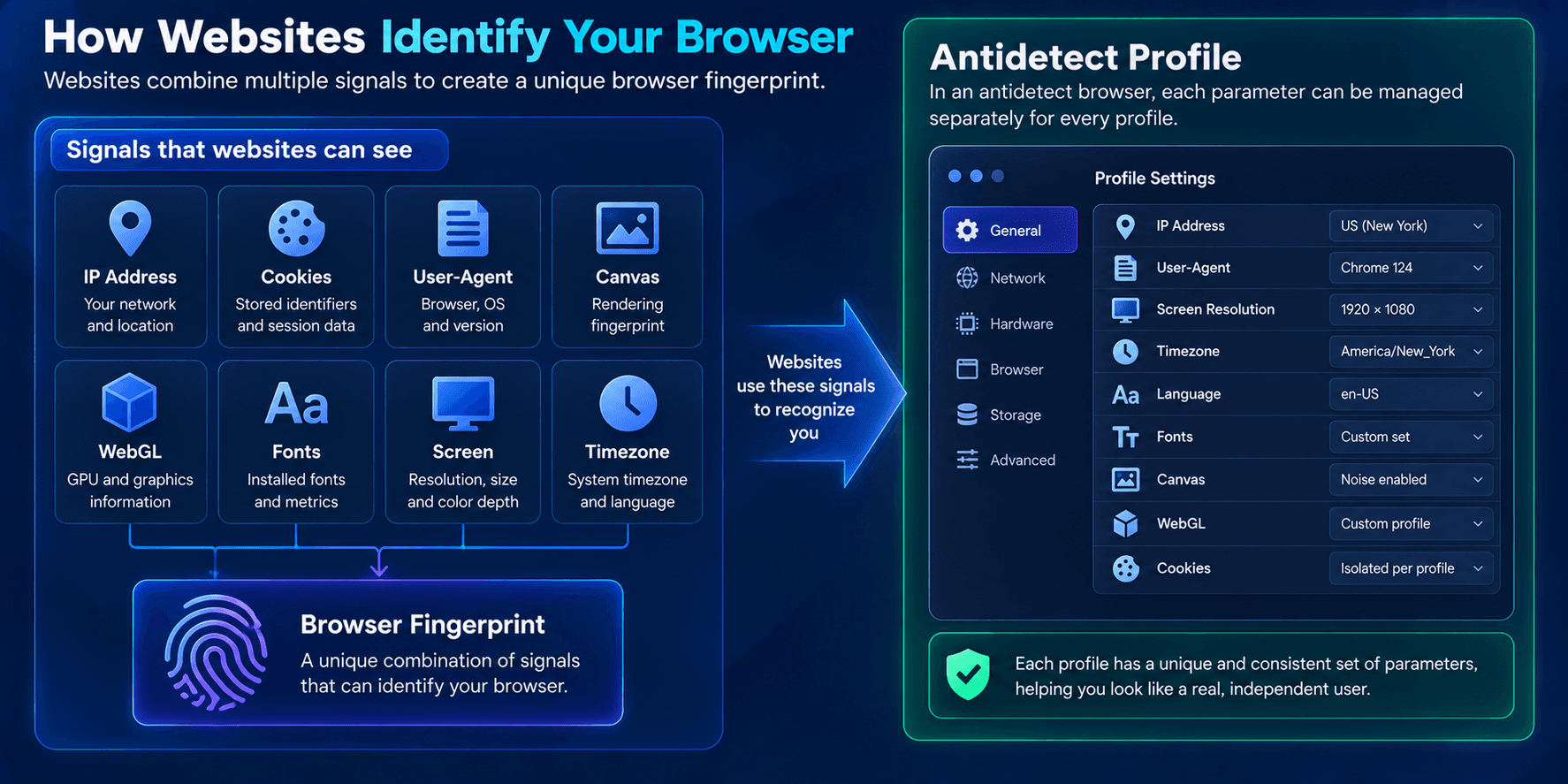
Websites can still observe many characteristics of the browser and device, including:
- browser version;
- operating system;
- screen resolution;
- installed fonts;
- language;
- timezone;
- Canvas;
- WebGL;
- other Browser Fingerprint signals.
These values can be combined into a Browser Fingerprint, which may help websites recognize the same browser environment even without relying only on Cookies.
Therefore, secure browsers provide useful tools for privacy and protection, but users who need separate profiles and deeper control over browser identity usually need a specialized antidetect solution.
What Are Antidetect Browsers?
Antidetect browsers are specialized tools designed to create and manage separate browser profiles with independent settings and session data.
Their main purpose is not simply to hide information but to provide control over the characteristics websites use to identify a browser environment.
Depending on the browser, each profile may have its own:
- User-Agent;
- Cookies;
- Local Storage;
- screen parameters;
- timezone;
- locale;
- WebRTC configuration;
- Canvas and WebGL behavior;
- proxy settings;
- other fingerprint-related parameters.
One of the key features of antidetect browsers is multi-profile management.
Users can create separate environments for different accounts or tasks, which is useful when working with multiple sessions on the same platform.
For example, marketers, testers, or support teams can keep profiles isolated so that Cookies, Local Storage, and other session data do not accidentally overlap.
Another important capability is Browser Fingerprint management.
Fingerprinting is a tracking technique based on collecting characteristics of a browser and device.
These characteristics may include:
- screen resolution;
- installed fonts;
- operating system;
- browser version;
- Canvas;
- WebGL;
- Audio;
- timezone;
- media devices.
Combined together, these parameters can form a recognizable fingerprint.
Antidetect browsers help manage or modify these characteristics so that individual profiles can maintain separate browser environments.
It is also important to distinguish Browser Fingerprint management from IP address changes.
An antidetect browser does not automatically change the public IP simply by modifying browser parameters. Different network identities usually require a proxy, VPN, or another network-level tool.
Key Differences Between Secure Browsers and Antidetect Browsers
Secure browsers and antidetect solutions use fundamentally different approaches to privacy.
Secure browsers focus mainly on reducing tracking, blocking malicious content, and protecting user data.
Antidetect browsers focus on creating and managing independent browser environments.
| Feature | Secure Browser | Antidetect Browser |
|---|---|---|
| Ad and tracker blocking | Common | May be available |
| Private browsing | Common | Not the main feature |
| Multiple isolated profiles | Limited | Core functionality |
| Browser Fingerprint management | Limited | Advanced |
| Per-profile proxy settings | Usually limited | Common |
| Session separation | Basic | Advanced |
| Main purpose | Privacy and security | Browser environment management |
When a Secure Browser Is Enough
A secure browser can be sufficient for many everyday scenarios, including:
- normal web browsing;
- using social media;
- online shopping;
- reducing advertising tracking;
- limiting third-party Cookies;
- protecting against some malicious websites.
Privacy can also be improved through additional browser settings.
For example:
- use built-in ad and tracker blocking;
- disable unnecessary third-party Cookies;
- regularly review site permissions;
- use Private Browsing for temporary sessions;
- clear unnecessary site data when needed.
Some users also install privacy extensions such as ad blockers or tracker blockers.
However, installing many extensions does not automatically make a browser more anonymous.
An unusual combination of extensions and settings can itself become part of the Browser Fingerprint.
When an Antidetect Browser Is More Suitable
An antidetect browser is more appropriate when the task requires more than general privacy protection.
Typical scenarios include:
- creating multiple isolated browser profiles;
- separating Cookies and session data between environments;
- assigning a separate proxy to each profile;
- controlling Browser Fingerprint parameters;
- transferring profiles between devices;
- working with profiles in a team;
- keeping browser environments consistent over long-term sessions.
In such cases, a secure browser and an antidetect browser solve different problems.
Tracker blocking does not replace profile isolation, and Incognito Mode does not create a fully independent Browser Fingerprint environment.
Which One Should You Choose?
The choice depends on your actual goal.
If you mainly want to reduce tracking, block ads, improve everyday browsing security, and keep temporary sessions private, a secure browser may be enough.
If you need multiple isolated environments, separate session data, individual proxy settings, and more control over Browser Fingerprint characteristics, a dedicated antidetect browser provides more suitable tools.
When choosing an antidetect browser, it is also important to look at consistency rather than only the number of available settings.
User-Agent, Client Hints, operating system, screen parameters, timezone, language, and network configuration should not obviously contradict each other.
Conclusion
Secure browsers and antidetect browsers are not direct replacements for one another.
Secure browsers are primarily focused on privacy and security: blocking trackers, reducing unwanted advertising, limiting data collection, and protecting users from malicious websites.
Antidetect browsers are designed for a different task — creating and managing isolated browser profiles with separate Cookies, Sessions, Browser Fingerprint parameters, and network settings.
For everyday privacy, browsers such as Brave, Tor Browser, or another privacy-oriented solution may be sufficient.
If your workflow requires multiple isolated profiles and more control over browser identity, a specialized antidetect browser is the more appropriate option.