Facebook Proxy: How to Use a Proxy for Facebook with WadeX
Learn how Facebook Proxies change the IP address visible to the platform, which proxy types are available, and how to configure them in WadeX.
- 1.What Is a Facebook Proxy?
- 2.Types of Facebook Proxies
- 3.Why Use a Facebook Proxy?
- 4.Why Pair Proxies With an Antidetect Browser?
- 5.How to Use a Proxy for Facebook in WadeX
- 6.WADE Proxy
- 7.Free vs. Paid Facebook Proxies
- 8.Common Mistakes When Using Facebook Proxies
- 9.Conclusion
Access to Facebook can sometimes be restricted by local regulations, internet providers, or corporate networks. In addition, Facebook may consider IP addresses, geolocation, and other connection parameters when evaluating account activity.
If you travel frequently, work with Facebook Ads, or manage multiple profiles, using a proxy can help separate different working environments and change the IP address visible to Facebook.
A Facebook Proxy provides a different IP address and corresponding apparent location. This can be useful for accessing Facebook through another network, improving privacy, and separating different projects or accounts.
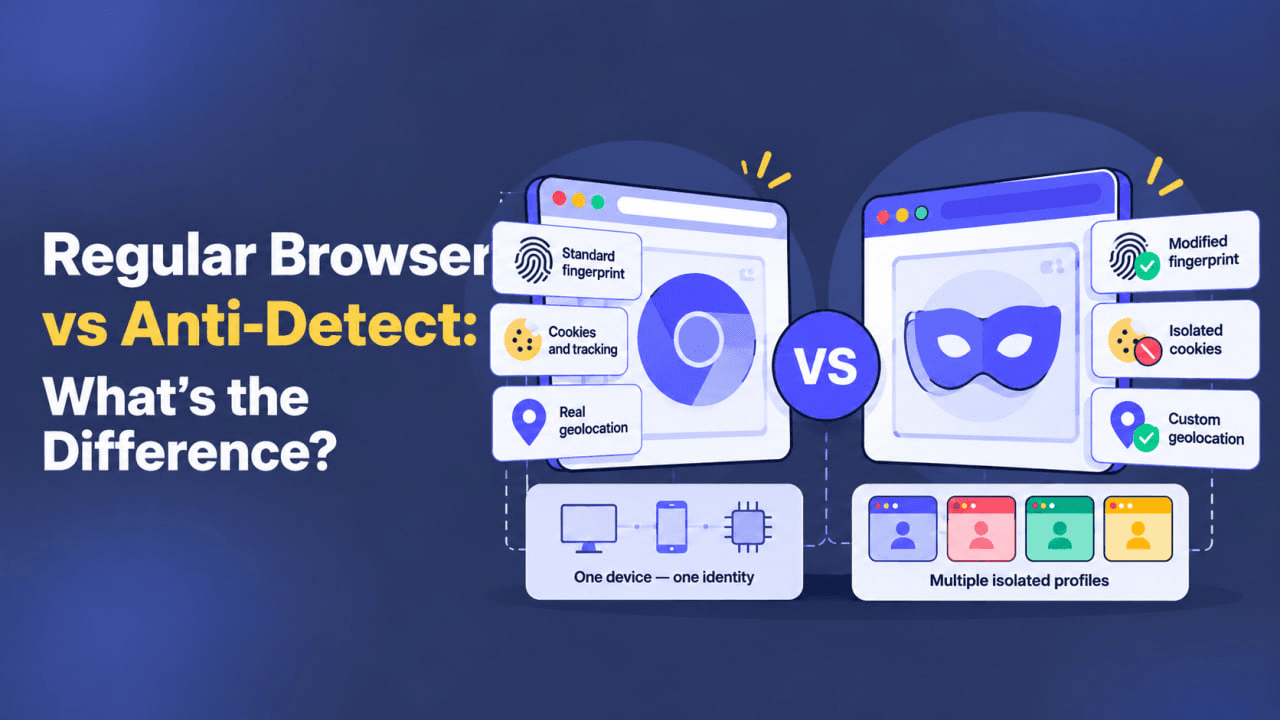
An antidetect browser can provide an additional layer of separation. WadeX allows users to create individual browser profiles with isolated local data and consistent browser environment parameters.
In this setup, the proxy handles the network connection and IP address, while WadeX provides a separate browser environment for each profile.
What Is a Facebook Proxy?
A Facebook Proxy is a proxy server used to connect to Facebook.
Instead of connecting directly, your browser first connects to the proxy server, which then establishes the connection to Facebook. As a result, the platform sees the proxy server’s IP address rather than the original public IP of your connection.

This matters because Facebook may consider IP Reputation, ASN, geolocation, and previous activity associated with an IP address when evaluating a connection.
For example, a Datacenter IP belongs to hosting infrastructure and can be identified by its network range and ASN. A Residential IP, on the other hand, belongs to an ISP range and is generally closer to the type of connection used by regular home internet users.
Using a proxy can provide several practical benefits:
- connecting to Facebook through a different IP address;
- hiding your original public IP from Facebook;
- separating network connections between browser profiles;
- selecting a particular country or region when supported by the proxy provider.
However, changing the IP address alone does not create complete browser isolation.
Facebook may also consider Cookies, Local Storage, Browser Fingerprint characteristics, device parameters, and account history.
Types of Facebook Proxies
Facebook Datacenter Proxy
Datacenter Proxies use IP addresses associated with hosting providers and data centers.
They are generally:
- fast;
- relatively inexpensive;
- available in large quantities.
The main limitation is that the network type can usually be identified through its ASN and IP range.
For this reason, Datacenter Proxies are commonly suitable for testing, regular browsing, and other tasks where Residential or Mobile network characteristics are not required.
Facebook Residential Proxy
A Facebook Residential Proxy uses an IP address associated with a regular internet service provider.
At the network level, this type of connection is closer to a typical home internet connection.
Residential Proxies are commonly used for:
- personal profiles;
- business accounts;
- Facebook Ads;
- tasks that require a stable regional IP location.
However, using a Residential IP does not guarantee that an account will avoid additional checks. Facebook can analyze many signals beyond the IP type.
Facebook Mobile Proxy
A Facebook Mobile Proxy routes traffic through IP addresses associated with mobile carriers.
Because of technologies such as CGNAT, the same public mobile IP may be shared by many subscribers.
Mobile Proxies are commonly used when a mobile carrier IP or Mobile ASN is relevant to the task.
| Task / Goal | Suitable Proxy Type | Comment |
|---|---|---|
| Basic browsing / testing | Datacenter | Fast and inexpensive, but the IP belongs to hosting infrastructure |
| Personal or business pages | Residential | Network characteristics are closer to a home connection |
| Facebook Ads and billing-related work | Residential / Mobile | Can better match a typical user connection |
| Managing multiple profiles | Mobile / Residential | Allows network connections to be separated between profiles |
| Accessing Facebook through another region | Residential / Mobile | Can provide an IP from the required country when available |
Why Use a Facebook Proxy?
One of the most common reasons to use a proxy is to connect to Facebook through a different IP address.
If access to the platform is restricted on a particular network or in a particular region, a proxy may route the connection through a server in another location.
Privacy is another reason.
When Facebook traffic is routed through a proxy, the platform sees the proxy server’s IP address rather than the user’s original public IP.
However, a proxy only changes the network connection. It does not disable:
- Cookies;
- Local Storage;
- Browser Fingerprinting;
- account-based tracking;
- other browser-level signals.
Proxies can also be useful when working with multiple accounts.
Instead of running every browser profile through the same public IP, each profile can be assigned a separate connection.
This helps separate the network layer of different browser environments.
Why Pair Proxies With an Antidetect Browser?
A proxy changes the network route and visible IP address.
An antidetect browser works with the browser environment itself.
WadeX is designed to create separate browser profiles that can maintain their own:
- Cookies;
- Local Storage;
- Session Storage;
- Browser Cache;
- Browser Fingerprint parameters;
- network settings.
When using Facebook Proxies with WadeX, a separate proxy can be assigned to each browser profile.
This gives each profile its own local browser storage and network connection.
Consistency between different parameters is also important.
For example, if a proxy is located in a particular country, the profile’s geolocation, Timezone, and language settings should not create obvious contradictions with that network location.
WadeX can help maintain a consistent browser environment, but using an antidetect browser does not guarantee that Facebook checks will be avoided or that an account will never be restricted.
How to Use a Proxy for Facebook in WadeX
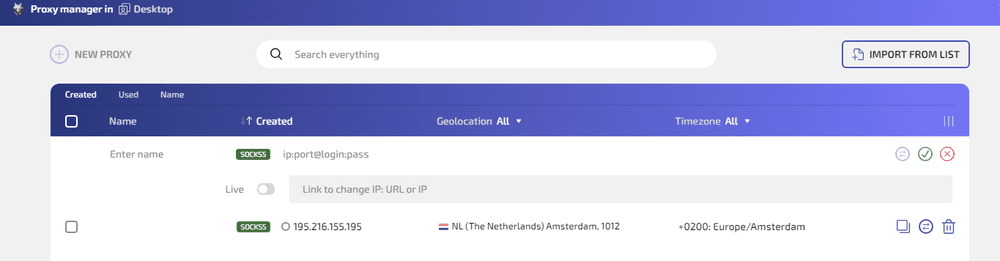
WadeX allows you to add proxies, assign them to individual profiles, change connection settings, and use the integrated WADE Proxy service.
If you are working with a single Facebook profile, you can assign the connection directly from the profiles table.
Open the menu for the required profile and select Set proxy.
Then:
- Select the required connection type.
- Enter the proxy details.
- If applicable, use the
ip:port:login:passwordformat. - Run the proxy check.
- Verify that the detected IP, country, and Timezone match the expected configuration.
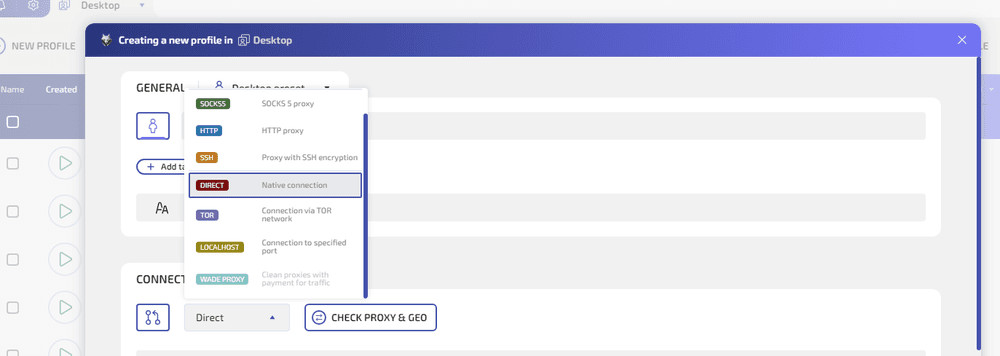
You can also configure the proxy while creating a new profile.
In the Connection section, switch the connection type from Direct to the required proxy option and run Check proxy & geo before saving the profile.
If you manage many proxies, it is more convenient to use Proxy Manager.
The Proxy button in the top bar opens a dedicated section for managing proxy connections.
Here you can:
- add proxies individually;
- import a proxy list;
- store IP addresses, ports, and authentication credentials;
- assign recognizable names to proxies;
- assign saved connections to browser profiles.
When creating profiles in bulk through the Multiple menu, you can prepare several browser environments and assign a separate connection to each one.
Proxy settings can also be changed when necessary.
If an IP stops working, becomes slow, or you need to change the connection region, the profile’s network configuration can be updated.
WADE Proxy
In addition to third-party proxy providers, WadeX includes its own WADE Proxy option.
Users can select a proxy traffic package from their account and then choose WADE Proxy as the connection type inside a browser profile.
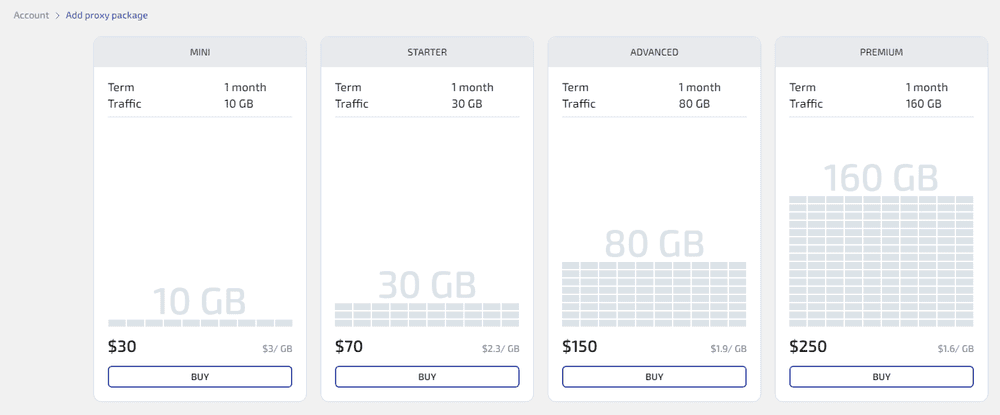
This makes it possible to manage the proxy connection directly through the WadeX interface without separately importing configurations from an external provider.
The process of purchasing traffic, configuring the connection, and assigning it to a specific browser profile can therefore be managed from the same environment.
Free vs. Paid Facebook Proxies
Free proxies can be useful for basic testing or temporary access.
However, they commonly have several limitations:
- low connection speeds;
- unstable availability;
- many users sharing the same IP;
- unknown IP history;
- limited location options;
- little or no technical support.
For accounts used regularly, paid proxies are generally a more practical option.
Depending on the provider, they may offer:
- more stable connections;
- country or region selection;
- IP replacement options;
- technical support;
- clearer connection parameters.
However, proxy quality depends on the provider, and paying for an IP address does not guarantee that Facebook will not apply additional checks or restrictions.
Common Mistakes When Using Facebook Proxies
Even a high-quality proxy can be part of an inconsistent configuration.
Common mistakes include:
- using the same proxy for several unrelated accounts;
- rapidly switching between distant countries;
- combining a proxy type with contradictory browser profile parameters;
- reusing the same Cookies and browser data across different accounts;
- using Timezone, language, or geolocation settings that conflict with the proxy location.
For example, if an account is regularly used from an IP in one country and then suddenly connects from a distant region shortly afterward, the change may become an additional risk signal for the platform.
The same principle applies to Browser Fingerprint characteristics.
Network and browser environments should remain reasonably consistent, without obvious conflicts between the IP location, Timezone, language, and other parameters.
Conclusion
Proxies and antidetect browsers solve different parts of the same environment-management problem.
A Facebook Proxy operates at the network level. It changes the IP address used to connect to Facebook and can provide a different network location.
WadeX operates at the browser level. Separate profiles isolate Cookies, Local Storage, Browser Cache, and other browser data.
When working with multiple Facebook accounts, a separate WadeX profile and proxy can be used for each account.
Residential or Mobile Proxies are commonly selected for long-term environments when their network characteristics match the task.
The most important principle is consistency: keep connections reasonably stable, avoid mixing data between profiles, and make sure the IP location, Timezone, language, and other browser parameters do not contradict one another.
This approach cannot guarantee that Facebook will never request additional verification or apply restrictions, but it helps maintain separate and more consistent browser environments.